Run the home. Let it do the remembering.
One calm screen each morning. The right check in front of the right person on shift. Everything an inspector asks for, filed as the work gets done, so more of your day goes to the residents.
Built inside a working nursing home in Surrey.

Hundreds of dates, and one of you.
DoLS renewals. Nurses’ revalidations. Fire checks, supervisions, the complaint that needs a reply by Thursday. As a registered manager you hold hundreds of dates, and most of them live in a diary, a spreadsheet and your memory. The work gets done. Remembering all of it, and proving it later, is what wears you down, and it’s time taken from the residents.
Compliance Workspace does the remembering. It knows what’s due, who it’s with and what happened last time. When something’s missed, it stays in front of you until someone does it or writes down why. The hours you used to spend chasing dates go back on the floor.
A diary can’t nudge you, and a spreadsheet doesn’t notice a date going past. This does.
One calm screen, then on with your day
A day in a sample home.
Open Today
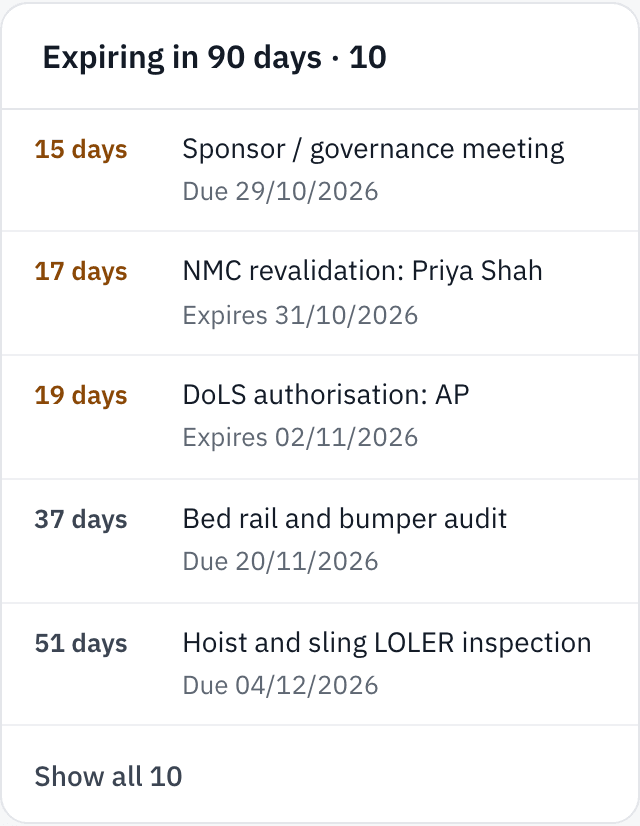
Act now shows what needs you, people at risk first. In this sample home, a resident’s DoLS authorisation has run out and a fire-exit check was missed on Monday. Further down, a nurse’s revalidation is due in 17 days, flagged weeks ahead so it never lapses on a shift. If nothing’s urgent, it says so.

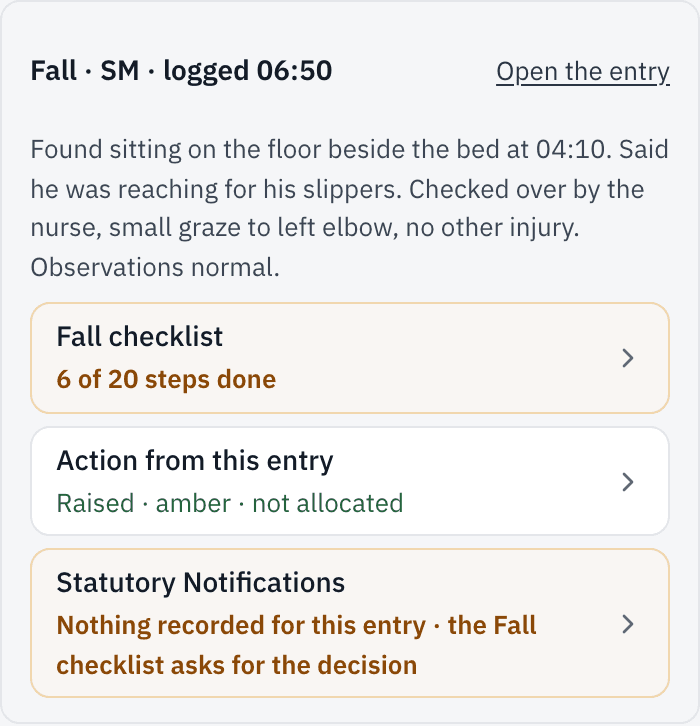
Last night’s fall is already in hand
At 04:10 a resident was found on the floor. The night nurse logged it before handover, and that started the fall checklist: observations, the GP, the family, the falls risk assessment, the care plan, each with its own deadline. When you review the handover, it’s all there, including the CQC notification decision still to make. If any step goes past its date, it goes into Act now.
The nurse in charge takes charge
Whoever’s running the shift presses “Take charge” and sees the checks that belong to that role today. The fire panel and the sluice have their own QR codes: scan, answer on a phone, recorded against their name. Nobody has to hand out a list.
The app checks itself every day
It works out what’s due, what’s slipped and what’s about to lapse. You don’t have to go looking.
More than 180 checks, daily to yearly. More than 50 answer themselves from your registers.
Do the work once. The evidence is already there.
Every check, Action and register entry is recorded as it happens, with who did it and when. That record is your evidence. Nobody has to write it up again in a binder.
It was built for governance from day one, inside a working nursing home. It isn’t a module added to a care-notes system.
A second pair of eyes on every problem.Every incident, safeguarding concern and complaint gets a named owner. Nobody signs off their own work, and four weeks later the app asks whether the fix actually worked.
DoLS, kept in date.Every authorisation has an end date and a next step. A lapsed one goes straight to the top of Act now. The decision is always a Manager’s.
Registers that keep themselves honest.Nothing quietly disappears: when a row is removed, the app records who removed it and why. It also points out patterns you’d want to know about.
From enquiry to leaving: a Waiting List with a pre-admission assessment, an admission checklist, and a DoLS decision due within seven days. When someone leaves, every open Action is closed off with a reason.
Policies your staff actually read
A policy pack hands you a stack of documents. Here, the policy, the checks that put it into practice and the proof that it happened all live in one place.

- A library of 159 original policy templates, grouped by CQC’s five key questions, each tagged with the quality statements and regulations it covers.
- Adopt a template, edit it into your home’s own policy, and the Owner or a Manager who didn’t edit it approves it.
- Review dates come round on Today, so nothing goes out of date in a drawer.
- Staff read and sign each policy on their phone. You can see at a glance who has and who hasn’t.
- One report shows an inspector which policies you hold, when each was approved and is next due for review, and who has signed them.
- Written against current UK guidance and approved before release.
When the inspector rings, you’re already ready
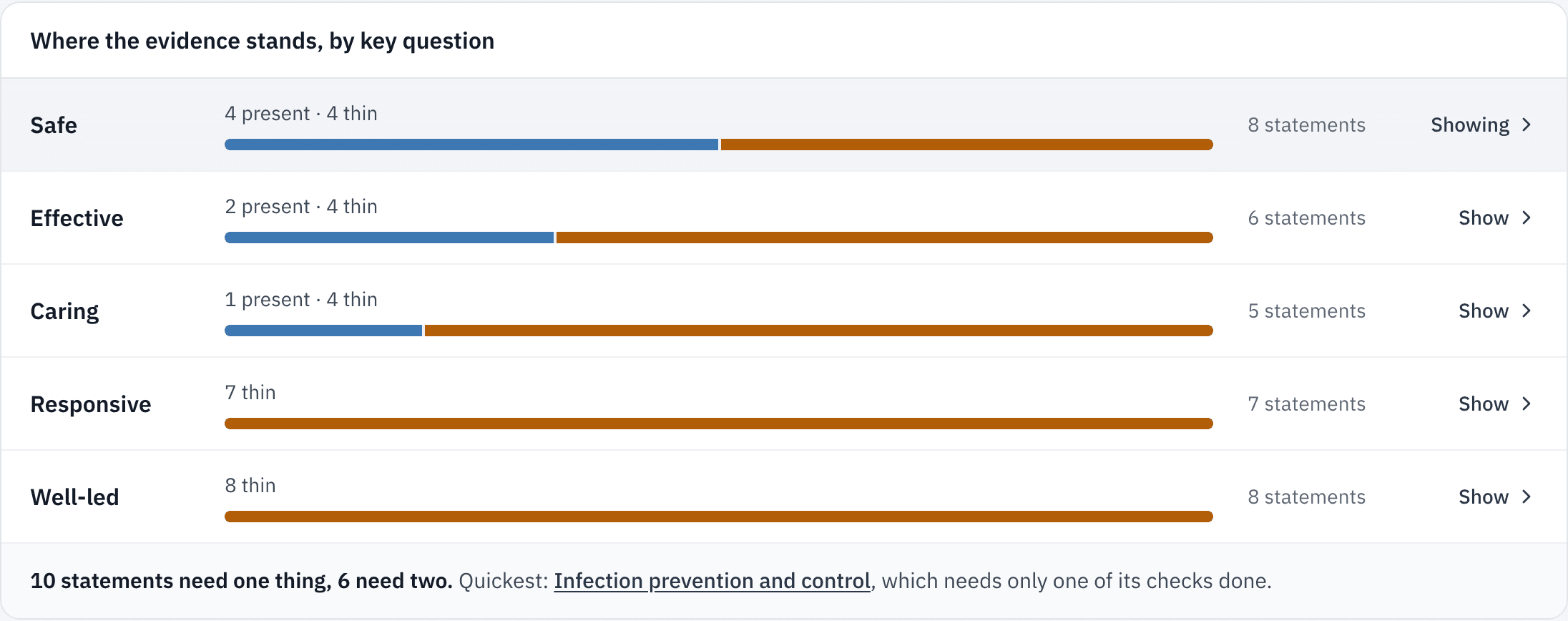
All 34 of CQC’s quality statements, each graded on the evidence behind it: current, present, thin or nothing recorded. The dated records sit underneath, in CQC’s own wording. Evidence that comes only from policies and procedures can’t score higher than “present”, because an inspector wants to see the practice too. Export the evidence pack and walk them through it live.
It shows whether your evidence exists and how fresh it is. It doesn’t judge the quality of your care and it doesn’t predict a rating.
Your PIR, started for you.CQC’s question set, with figures suggested from your registers. You check it and submit it yourself.
A governance pack for any period.Actions, verification, where things stand, the staffing trend, all built live from your records.
Monthly returns on time.Your quality report and monthly returns are due by the 10th, and they sit on Today until they’re done.
Why I built it
I own and run a CQC-registered nursing home in Surrey. The remembering and the proof lived in diaries, spreadsheets and my own head: hours that should have gone to the residents. So I built the system I wanted for my own home. It carries the paperwork, so the people can get back to care. Now it’s ready for yours.
Louis, founder
Running more than one home?
One sign-in reaches all of them. Switch between homes, and see each home’s red and overdue Actions on one page. Group pricing starts at two homes.
You see what your manager sees, and nothing gets signed off by the person who did the work.
Your residents’ data, handled with care
- Stored in the EU, in Ireland. The app runs on servers in London.
- Each home’s records are walled off from every other home’s at the database itself.
- Compliance records use residents’ initials. Full names sit on the Residents list, which only Owners, Managers and Seniors can open.
- AI features stay off unless your Owner switches them on.
- Download everything from Settings whenever you like.
One plan, everything included
- £99 a month
- for one home, or £899 a year.
- £79 per home
- a month for two or more homes, or £719 per home a year.
Every home gets the Owner plus five more sign-ins. See full pricing
How to start
Book a walkthrough
30 minutes on a video call. We show you the app on a sample home, not anyone’s real records.
We switch your home on
We send you the Owner sign-in.
Answer 19 questions about your home
The checks that don’t apply switch off, and the ready-made checklists are added.
Bring your team in
Invite your Managers, Seniors and Staff, allocate checks to roles, and put the QR codes up.
Questions managers ask
Does it replace our care planning or eMAR system?
No. It sits alongside them and looks after the governance side. Your care records stay where they are.
Is it approved by CQC?
No. CQC doesn’t approve software, and nothing can promise you a rating. It shows you, honestly, where your evidence stands.
Does it send anything to CQC for us?
No. It gets things ready for you. Anything that goes to CQC, you send yourself.
Where do the policy templates come from?
We write them ourselves. You adapt each one to your home, so the approved version is yours.
Do we have to use AI?
No. It’s off unless you switch it on, and everything else works without it.
Can a manager sign off their own work?
No. Someone else checks it.
How many people can sign in?
The Owner plus five more, per home.
Can we take our data with us?
Yes. You can download everything whenever you like.
Is it only for nursing homes?
No. It’s built for CQC-registered care homes, residential or nursing.
Go home on time. Be ready when they ring.
A 30-minute walkthrough on a sample home, no commitment.
Book a walkthrough